See what Claude Code really costs you.
Agento reads the session files Claude Code already writes to your disk and turns them into cost analytics, productivity insights and a searchable, replayable history of every run. Then it lets you build agents, schedule them, and connect them to your tools.
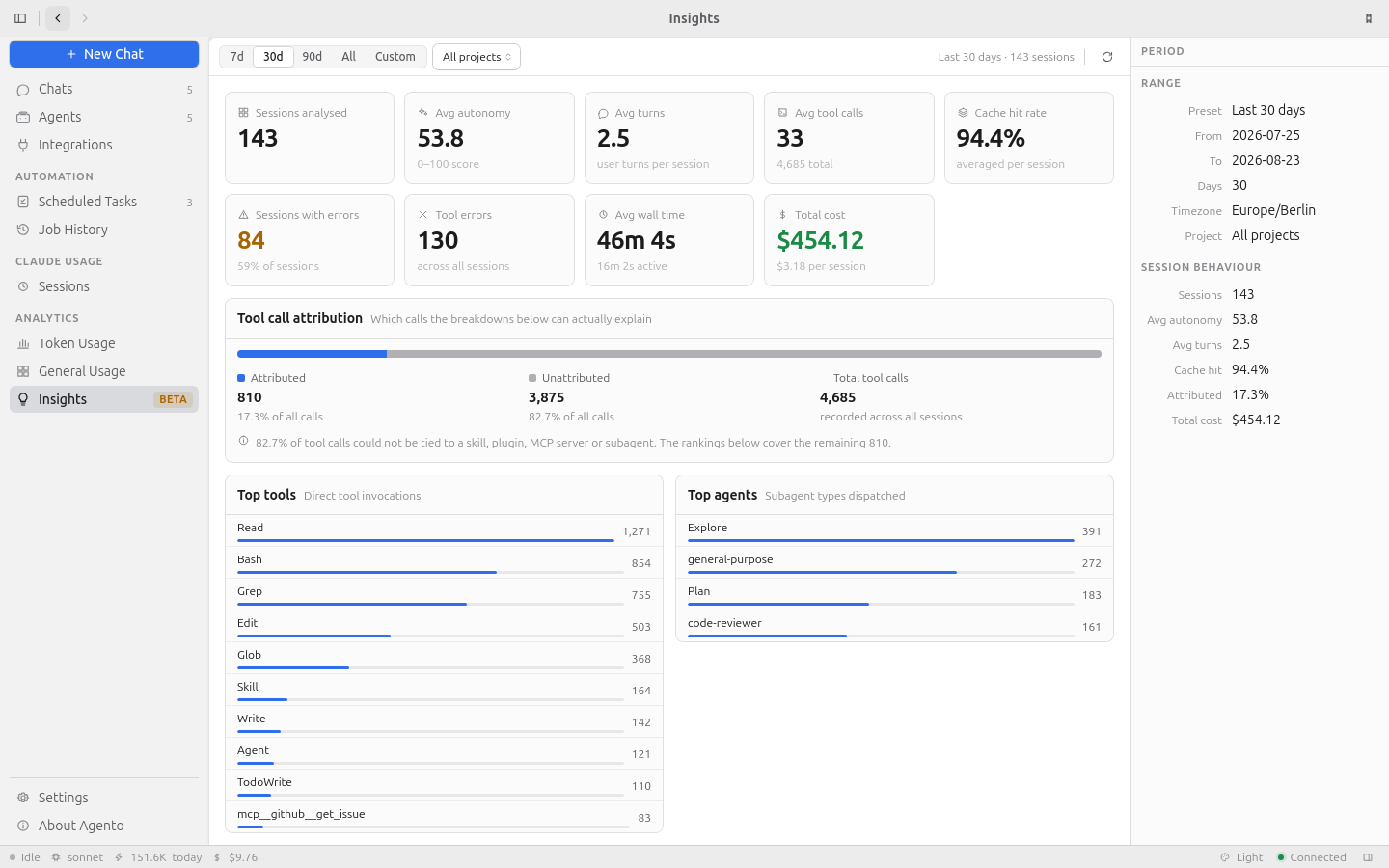
Two halves, one window.
What you getYour history, made legible
Agento never asks you to change how you work. It reads what Claude Code already wrote.
- Cost per session, priced at the rate in effect when each message ran.
- Full-text search across every transcript, ranked, with snippets.
- Session journey — turn by turn, sub-agents nested under the task that spawned them.
Agents that do the work
Build one, give it tools, hand it a schedule, and read the job history in the morning.
- Agent builder with system prompts, tool allowlists and permission modes.
- Scheduled tasks — cron, intervals, or a one-off at a fixed instant.
- GitHub, Slack, Jira, Confluence, Telegram, Google as in-process MCP servers.
Every section, one keystroke away.
⌘KTalk to your agents
Streaming turns, tool calls rendered inline, and a permission prompt you can actually answer.
Build and version them
Prompt templates with variables, tool allowlists, and a Claude settings profile per agent.
Put them on a clock
Cron expressions validated at save time, so a schedule that can never fire is refused.
Replay any run
Ranked search over 1,000+ transcripts, then continue any one of them as a live chat.
Where the money went
Cost by model and project, cache-hit rate, and an activity heatmap in your own timezone.
Route your other tools
One OpenAI- and Anthropic-compatible endpoint on loopback, with usage and cost per request.
Installed in about a minute.
InstallHave the Claude Code CLI, signed in
Agento runs every agent through the CLI you already have and reuses its sign-in. There is no Anthropic API key to enter. If this prints a version, you are ready:
claude --versionmacOSRecommended for you2 files
- Open the .dmg and drag Agento to Applications.
- If macOS says the app cannot be verified, right-click it and choose Open. If that gives you no Open button, clear the quarantine flag:
xattr -dr com.apple.quarantine /Applications/Agento.app
Apple menu → About This Mac tells you which chip you have.
WindowsRecommended for you1 file
- Run the installer.
- SmartScreen may warn that the publisher is unknown — choose More info, then Run anyway. These builds are signed by our own key rather than an EV certificate.
Updates arrive in the app after the first install.
LinuxRecommended for you6 files
- AppImage — works on any distribution, and updates in-app:
chmod +x Agento_1.6.0_amd64.AppImage
./Agento_1.6.0_amd64.AppImage
- Or install the native package:
sudo dpkg -i Agento_1.6.0_amd64.deb      # Debian, Ubuntu
sudo rpm -i  Agento-1.6.0-1.x86_64.rpm   # Fedora, RHEL
The AppImage updates itself; .deb and .rpm are notify-only, because dpkg and rpm own their files.
Not your platform?Every file in v1.6.0 ↗·Full installation guide
Built for the desk, not the tab.
Design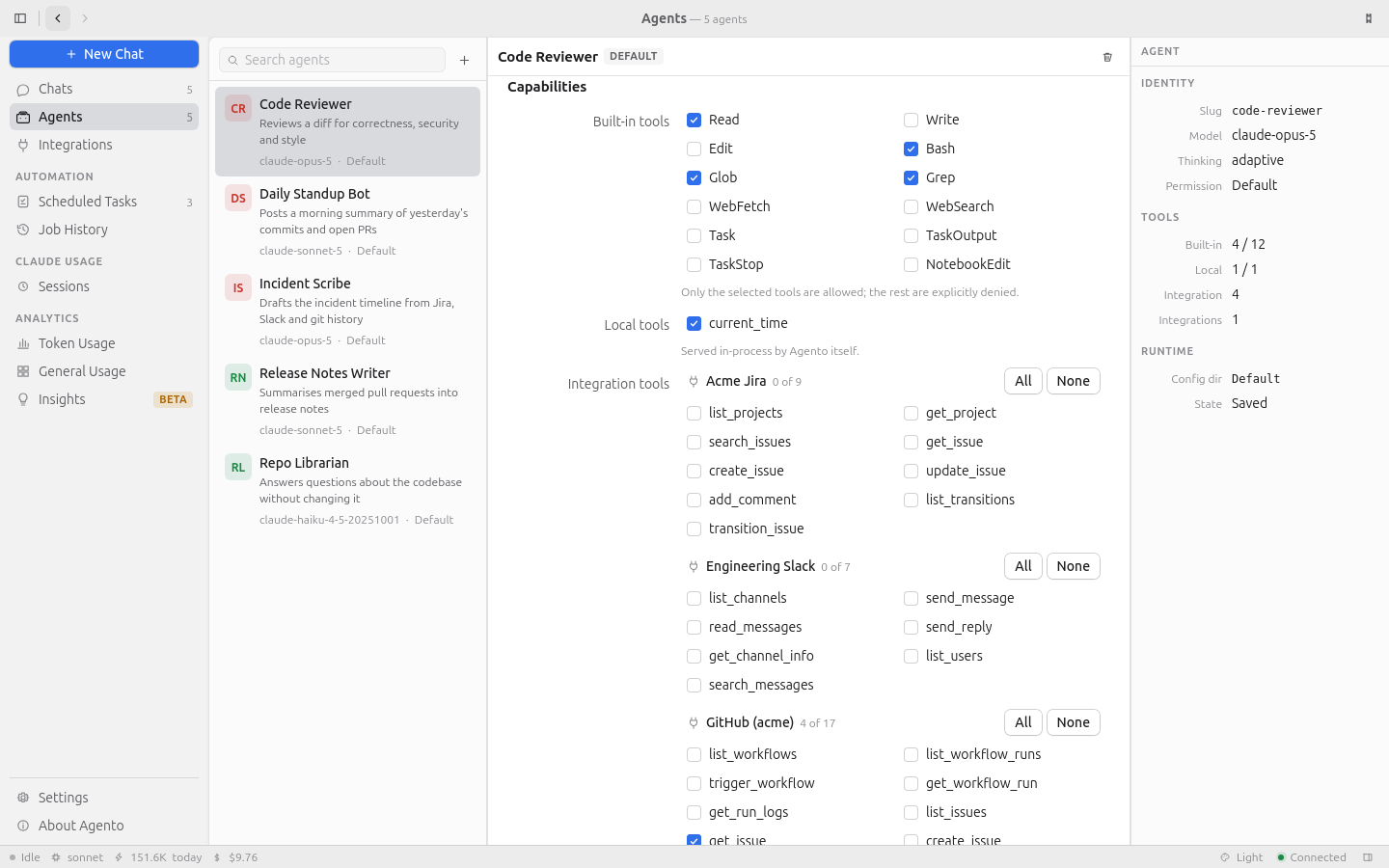
A native app that behaves like one
Three resizable panes per section, hairline borders, focus-aware selection, a status bar, and a command palette. No browser affordances, because it is not a browser.
One process, one SQLite file, and the Claude Code CLI spawned per run. The whole backend is Rust; the window is Tauri.
Does Agento send my transcripts anywhere?
No. Everything is stored locally in ~/.agento, and your Claude Code transcripts in ~/.claude are read but never modified. There is no account, no telemetry and no analytics. The only outbound calls are the ones you asked for: agent runs, the integrations you connected, the update check — which you can switch off — and, if you turn it on, the providers the LLM Gateway forwards to.
Privacy ↗Do I need an Anthropic API key?
No. Agento runs every agent by launching the Claude Code CLI on your machine and reuses its sign-in. If claude works in your terminal, Agento works. The app tells you on launch if it cannot find the CLI, and where it looked.
Requirements ↗Will it change anything in ~/.claude?
Your session transcripts are read only. Agento does write Claude Code's own settings.json and the settings profiles beside it — but only when you edit them from the Settings section yourself. Everything Agento owns lives in ~/.agento, and deleting that directory resets it completely.
Where your data lives ↗Can I point my other tools at it?
Yes. The LLM Gateway is an OpenAI- and Anthropic-compatible endpoint on loopback that routes to whichever providers you configure, and records usage and cost per request. It is off by default and costs one database read at startup when it is.
LLM Gateway ↗How are my integration credentials stored?
In plain text, in the local database. Their protection is your user account and your disk permissions, so treat ~/.agento as sensitive. The API scrubs secrets from every response and the app never displays one back to you, but the bytes at rest are not encrypted.
Privacy ↗Star the repo
Stars are how the next Claude Code user finds Agento. It is the whole of our distribution — there is no ad budget and nothing tracks you here.
Your sessions are already on disk.
Agento just reads them. Install it, and the last six months of your Claude Code usage become a dashboard you can search.